Plan office collaboration spaces by identifying what people need to accomplish together. A short project check-in, a working session and a confidential discussion have different requirements. Match the setting, furniture and technology to those tasks before deciding how many rooms to build.
Steelcase's 15 Reasons Why the Office Matters presents collaboration, learning and connection as reasons to invest in shared workplaces. For a business planning its next office, the useful next question is practical: which shared activities does your space need to support?
This guide focuses on that room-level decision. A broader workplace design plan should connect those settings to headcount, circulation and the rest of the office.
Key Takeaways
- Define collaboration by task, group size, privacy and participation needs.
- Test rooms from every seat and from the remote participant's perspective.
- Give collaboration and focused work clear places in the plan.
1. Make a short inventory of shared work
Ask team leads to describe recurring activities using recent examples. Avoid relying on labels such as “creative team” or “collaborative culture.” Record what happens during the session and what people need to leave with.
For each activity, note the usual group size, duration and frequency. Identify whether people review a screen, work on physical materials, write on a wall or talk through sensitive information. Include participants who join by video.
Then check the current space against that inventory. A large conference room booked by pairs may signal a missing smaller setting. It could also reflect a scheduling habit or a technology limitation elsewhere. Look at the reason for the booking before turning it into a construction requirement.
Include tasks that follow the meeting. If a team reviews a proposal together and then needs quiet time to revise it, the plan must support both parts of the work.
2. Use a matrix to match tasks with settings
Use this planning matrix as a starting brief. These are proposed settings to test with your team, not fixed room sizes or a universal office formula.
| Shared activity | Setting to evaluate | Furniture and technology questions | Test before approval |
|---|---|---|---|
| Short project check-in | Small setting near the team, where conversation will not interrupt adjacent work | Is there a usable surface for notes? Is power needed? | Can the group finish the task without spilling into a passage? |
| Working through a document together | Enclosed team room with a shared display | Can people use laptops, see the document and reach connections? | Have the usual group review an actual document from every seat. |
| Mapping ideas or reviewing physical samples | Project setting with work surfaces and space to display material | Where will work remain between sessions? Who resets the room? | Lay out representative materials and check access around the setup. |
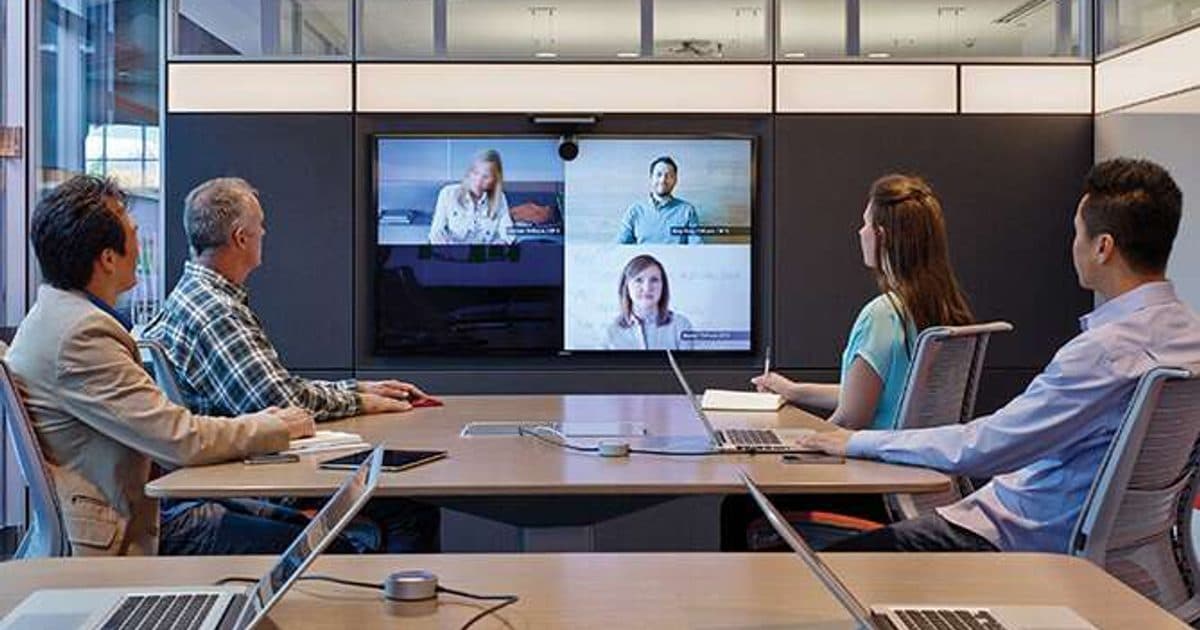
| A meeting with remote participants | Room planned around its camera, audio and shared content | Can each seat participate? How will notes reach remote colleagues? | Join from outside the room and test the full meeting sequence. |
| Coaching or a confidential discussion | Enclosed setting with privacy appropriate to the conversation | What speech privacy is required? Who will assess the room? | Ask the project team to define and verify the privacy requirement. |
The U.S. General Services Administration recommends a mix of settings for concentration, collaboration and private conversation in its workplace project guidance. Use your task inventory to decide what that mix should include in your office.
3. Plan sound and adjacency together
Identify the work next to each proposed collaboration space. A room that supports one team can still create problems for the people outside it.
Mark expected conversation areas and concentration areas on the same plan. Review door locations, circulation and where people gather before and after meetings. Ask the design team which conditions need acoustic assessment, especially where speech privacy matters.
Be precise about the requirement. Reducing the sense of echo inside a room and keeping a conversation private are different objectives. Write the intended use into the brief so the project team can specify and verify the appropriate solution.
Include focused work in the discussion from the beginning. Don't make employees improvise a quiet setting after every team session. The existing hybrid office planning guide covers broader flexibility considerations; this task inventory helps turn those choices into specific room requirements.
4. Test hybrid participation with a real meeting
Test the proposed setup with the people and tools it needs to support. A room can look complete on a plan while leaving a seat outside the camera view or making shared content difficult to follow.
Run a short trial that includes joining the meeting, speaking from each seat, sharing a document and recording a decision. Ask a remote colleague to assess what they could see and hear. Include the room positions people are likely to use when it is full.
If the meeting uses a physical writing surface, decide how its content will reach remote participants. Confirm that process during the trial. Also test how the room returns to its normal setup after someone changes a connection or moves furniture.
Capture the findings as corrections for the furniture, technology and design teams. Assign one person to confirm that the complete setup works before the room enters regular use.
5. Test one arrangement before repeating it
Consider an illustrative office where pairs often book the largest conference room to review documents. Instead of assuming the office needs another large room, test a smaller enclosed setting with the display and work surface those pairs need.
Keep the larger room available for activities that use its capacity. During the trial, record whether the smaller setting supports document review, whether technology works and whether bookings shift. If people still choose the larger room, ask why.
This is a planning example, not a completed client project. The value lies in checking the assumption before repeating the same room across a floor plan.
6. Give each setting an operating plan
Decide how people will find, reserve and reset the space. A project room that holds materials between sessions needs different rules from a room intended for short, frequent meetings.
Assign ownership for technology issues, missing supplies and furniture changes. Set a date to review use after teams have had time to work in the setting. Look at both bookings and feedback: an occupied room may still be difficult to use.
For your Fort Myers or Sarasota office, bring the task inventory, current floor plan and known room problems into the design conversation. Those details give the project a concrete brief and a way to evaluate the result.
Plan your office collaboration spaces with OFDC Commercial Interiors.